
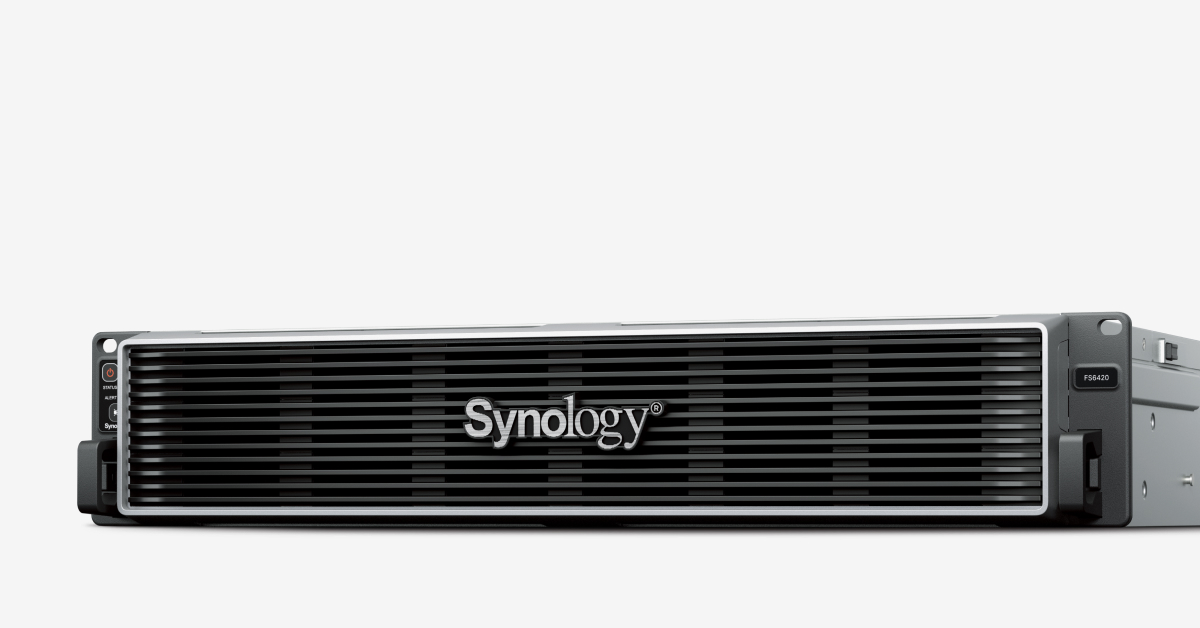
Synology FS6420
97067,00 zł
- Procesor: AMD EPYC 7303
- Pamięć systemowa: 64 GB DDR4 ECC RDIMM
- Łączna liczba gniazd pamięci: 16
- Maksymalna pojemność pamięci: 1024 GB (64 GB × 16)
- Wnęka dysków: 24 × 2.5″ SATA SSD
- Rozszerzenia PCIe: 2 × Gen4 x16 slot (x16 link)
- Gwarancja: 5 lat
Na stanie
|
Hardware Specifications
|
||
|---|---|---|
|
CPU
|
CPU Model | AMD EPYC 7303 |
| CPU Quantity | 1 | |
| CPU Cores | 16 | |
| CPU Threads | 32 | |
| CPU Architecture | 64-bit | |
| CPU Frequency | 2.4 (base) / 3.4 (turbo) GHz | |
| Hardware Encryption Engine | Yes | |
|
Memory
|
System Memory | 64 GB DDR4 ECC RDIMM |
| Memory Module Pre-installed | 64 GB (64 GB × 1) | |
| Total Memory Slots | 16 | |
| Maximum Memory Capacity | 1024 GB (64 GB × 16) | |
| Notes |
|
|
|
Storage
|
Drive Bays (See all supported drives) |
24 × 2.5″ SATA SSD
|
| Hot Swappable Drive* | Yes | |
| Notes |
|
|
|
External Ports
|
RJ-45 10GbE LAN Port | 2 |
| Out-of-Band Management LAN Port | 1 | |
| USB 3.2 Gen 1 Port | 2 | |
|
PCIe
|
PCIe Expansion | 2 × Gen4 x16 slot (x16 link) |
|
Appearance
|
Form Factor (RU) | 2U |
| Size (Height × Width × Depth) | 88 mm × 482 mm × 724 mm | |
| Weight | 15.5 kg | |
| Rack Installation Support* | 4-post 19″ rack (Synology Rail Kit – RKS-02) | |
| Notes | The rail kit is sold separately | |
|
Others
|
System Fan | 80 mm × 80 mm × 4 pcs |
| Fan Speed Mode |
|
|
| Easy Replacement System Fan | Yes | |
| Power Recovery | Yes | |
| Noise Level | 53.0 dB(A) | |
| Scheduled Power On / Off | Yes | |
| Wake on LAN / WAN | Yes | |
| Power Supply Unit / Adapter | 550 watts | |
| Redundant Power Supply | Yes | |
| AC Input Power Voltage | 100V to 240V AC | |
| Power Frequency | 50/60 Hz, Single Phase | |
| Power Consumption | 164.74 watts (Access) | |
| British Thermal Unit | 561.76 BTU/hr (Access) | |
| Notes |
|
|
|
Temperature
|
Operating Temperature | 0°C to 35°C (32°F to 95°F) |
| Storage Temperature | -20°C to 60°C (-5°F to 140°F) | |
| Operating Humidity | 8% to 80% RH | |
| Storage Humidity | 5% to 95% RH | |
|
Certification
|
|
|
|
Warranty
|
5 Years | |
| Notes | The warranty period starts from the purchase date as stated on your purchase receipt. (Learn more) | |
|
Environment
|
RoHS Compliant | |
|
Packaging Content
|
|
|
|
Optional Accessories
|
|
|
| Notes | For multi-module memory configurations, all modules must be identical and share the same model number. Check the Product Manual of your Synology product for recommended memory configurations. | |
Notes:
- Model specifications are subject to change without prior notice.
- The figures are based on Synology internal testing. Each performance test is done individually. No other services or applications are processed at the same time.
- The actual performance may be lower than lab testing figure due to differences in server configuration, deployment, and the number of active operations.
- If usage requirements exceed the specifications above, please contact our regional partners for professional advice.
FlashStation FS6420
High-performance all-flash storage for demanding, high-throughput workloads.
Harness all-flash storage to speed up business workflows
Flexible configuration
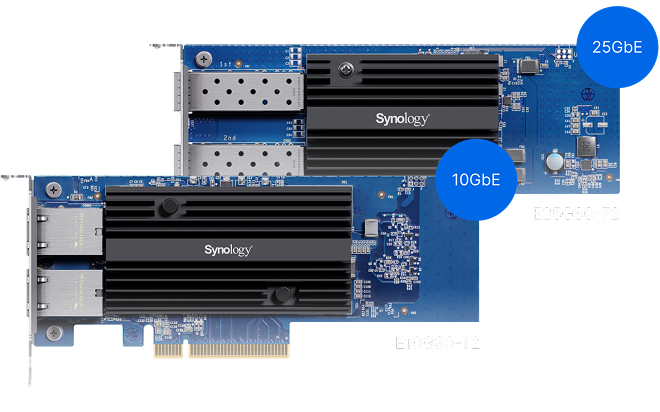
Supports additional 10/25GbE ports, Fibre Channel adapters5, and up to 1,024 GB of memory
Versatile business application platform
Enhance productivity with collaboration tools and run containerized or virtualized workloads
Accelerate your essential workloads
FS6420 delivers the performance and reliability you need to accelerate your demanding workloads and data services.
Performance that drives productivity
iSCSI: Random IOPS with SSD
Built for high reliability
Flexible, high-performance network connectivity
The FS6420 supports a wide range of networking interfaces, protocols, and configurations for seamless integration into enterprise environments.
Built-in fast connectivity
Two 10GbE RJ-45 ports provide excellent networking performance right out of the box.
Flexible networking options5
Improve I/O performance or add redundancy with optional 10GbE or 25GbE SFP+/SFP28 and 10GbE Ethernet NICs, or Fibre Channel HBAs.
Failover and network balancing
Bond multiple network interfaces with Link aggregation to enable automatic network failover and load balancing.
Storage efficiency
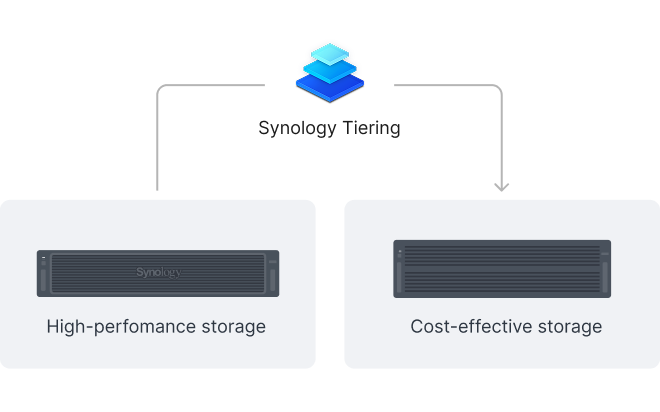
Automated storage tiering
Synology Tiering automatically moves infrequently accessed data from the FS6420 to cost-efficient tiers, balancing performance and capacity to maximize storage ROI. Flexible tiering policies, broad target support, and clear visibility into data usage help you adapt quickly to changing business needs.
Flash volume deduplication
Volume-wide deduplication on all-flash arrays removes redundant data, boosting storage efficiency by up to 65% for virtual desktops and virtual machines.
Container & VM hosting
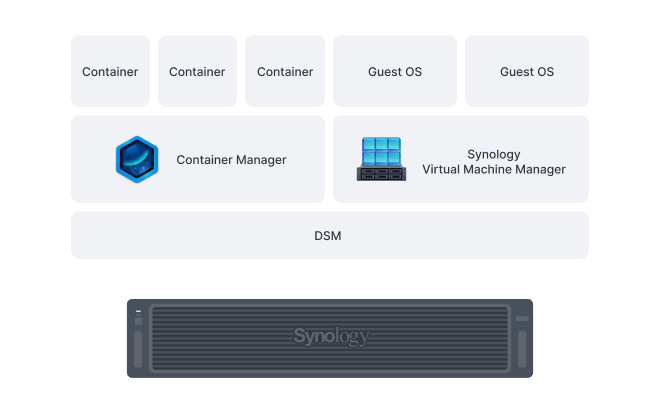
Container Manager enables easy deployment and management of Docker‑based containers on Synology systems, providing scalability and simplified management for thousands of apps. For full virtualization, Virtual Machine Manager (VMM) enables Windows®, Linux®, and DSM environments to run as isolated, flexible virtual machines, giving businesses the freedom to test, develop, and run diverse workloads securely on a single Synology system.7
Collaboration in a secure cloud, assisted by AI
Enhance workplace collaboration with Synology Office Suite. Create, edit, and share documents across teams in real time. Host an on-premises mail server to provide web-based email access while maintaining full data ownership.8 Additionally, stay connected through secure one-on-one chats, public channels, encrypted private channels, and group conversations. AI assistance enhances productivity across apps, with support for leading AI providers via API key integration.Learn more

Intuitive storage for on-site and remote teams
Provide secure and convenient cross-platform tile access, sharing, and synchronization across multiple locations.
A secure private cloud solution for enterprise collaboration
A private cloud suite for file sharing
Empower your entire organization with streamlined access, sharing, and syncing of data from any location. Establish granular control over file and folder access and sharing permissions. Maintain a comprehensive audit trail of file activities and track changes to file share settings with detailed records.Learn more
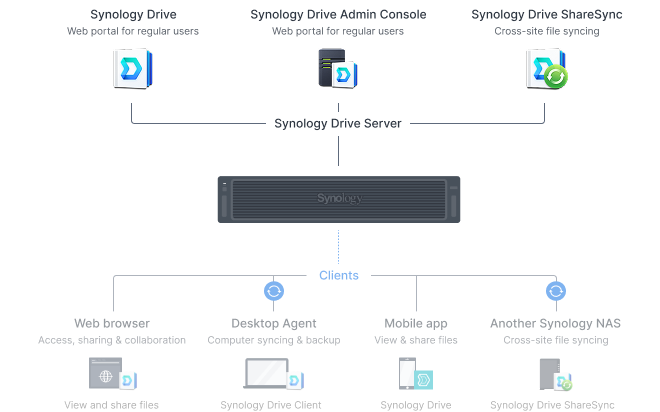
Multi-platform support
Access personal and shared data from mobile apps, desktop clients, web browsers, or another Synology system. Any changes you make are automatically synced to other devices as soon as they are connected.
Efficient multi-site synchronization
Cloud-powered multi-site syncing
Empower global workflows with high-speed access to data from anywhere in your network. Our hybrid cloud solution caches frequently used files locally for rapid access, while less frequently accessed data is stored in the cloud, reducing your on-site storage requirements.9Learn more
NAS-to-NAS synchronization
Automate site-to-site data synchronization for better team workflows. Options for one-way or two-way syncing keep files and folders up-to-date across every data site.Learn more
Sync to public cloud providers
Connect seamlessly to public cloud services including Amazon S3, BackBlaze B2, Dropbox, Google Cloud Storage, Microsoft Azure, and OpenStack Swift. Multiple protocol support, client-side encryption, and customizable sync and bandwidth controls enable efficient storage management across various platforms.Learn more
Comprehensive backup solutions
Endpoint, VM, and NAS/SAN protection
Securely back up a wide range of systems including Windows, Mac, and Linux endpoints, VMware® and Hyper-V® virtual machines, and Synology servers. Expand protection to physical servers running Windows or Linux, as well as storage solutions such as Nutanix Files, NetApp ONTAP, and Windows Server with VSS (Volume Shadow Copy Service). Built-in deduplication technology optimizes storage efficiency, while multi-versioning capabilities provide flexible restoration options.Learn more
Microsoft 365 and Google Workspace
Centralize backups of Microsoft 365 and Google Workspace data to protect cloud data from accidents and simplify compliance with data retention policies. Schedulable backups, flexible file versioning, and block-level deduplication ensure flexibility and storage and bandwidth savings.
Advanced data protection and recovery
Efficient and reliable Synology system backup
Back up entire systems or all data, applications, and configurations to a wide range of storage destinations, including Synology C2 Storage.9 In case of data loss, quickly restore complete systems through bare-metal recovery or retrieve individual files as needed. Advanced features including automated scheduling, granular access controls, end-to-end encryption, data deduplication, and multi-version retention empower you to create the optimal backup plan for your data deployment.Learn more
Tamper-proof protection with immutable snapshots
Safeguard critical LUNs and shared folders with automated immutable snapshots backed by custom retention policies. Built-in support for offsite replication further ensures robust business continuity.Learn more
Centralized monitoring and management
Monitor and manage your Synology fleet from a central interface, on-prem or in the cloud.

Central Management System
Manage Synology servers from a central console using group policies, task delegation, batch updates, and more.

Active Insight
Monitor your global Synology fleet’s performance, backup status, login activity, and more with the power of the cloud.
Podobne produkty
-

Synology RX418
2539,00 zł wybierz -

RAM1600DDR3L-4GBX2
2624,00 zł wybierz -

Synology RS1221+
6730,00 zł Dodaj do koszyka -

Naprawa płyty głównej w Synology (2U i 3U)
1845,00 zł wybierz -

Synology C2-BACKUP500G-1Y-EU
239,00 zł wybierz -

DEVICE LICENSE (X 1) – Synology – licencja na 1 dodatkową kamerę
307,00 zł Dodaj do koszyka -

Synology DS3622xs+
14370,00 zł Dodaj do koszyka -
Promocja!

Synology RS4021xs+
Pierwotna cena wynosiła: 29247,00 zł.28200,00 złAktualna cena wynosi: 28200,00 zł. wybierz -
Synology RS1221RP+
8800,00 zł wybierz -

Synology RS3618xs
14616,00 zł wybierz